What is JSON and How To Use It
Posted By : Prakhar Verma | 06-Dec-2017
JSON ==> "JSON stands for JavaScript Object Notation".
a). JSON is a lightweight data-interchange format. It is easy for humans to read and write. It is easy for
machines to parse and generate.
b). JSON is language independent.
c). JSON is a form of text.
d). JSON is easy for transfer over network and easy to parse over server side and client side.
e). Basically JSON is a form of key value or name value pair in which each key will be inside double quotes and value will be any thing.
For example : String, Boolean, Number, Double ,Object and null.
These types of value will be store as a value in json.
f). JSON is divided in two parts
[i] => JSON Object.
[ii] => JSON Array
First we discussed on JSON Object
For example i have a class Employee with fields name ,employeeId,age ,active and salary.
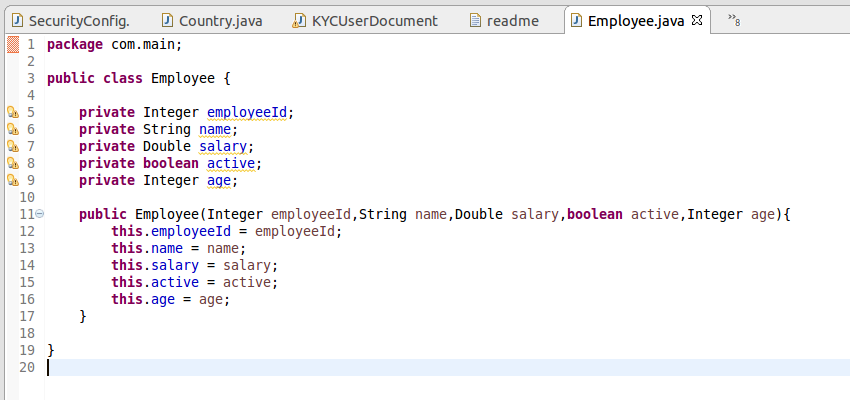
If we create JSON object of employe it will be look like as.
     {

        "employeeId" : 1,
        "name" : "Ram",
        "salary" : 30000.00,
        "active" : true,
        "age" : null

      }
Here we notice some points
1. All names are inside quotes.
2. Boolean value can be either true or false without quotes.
3. Integer is a wrapper type object in java it will be null.
4. Salary is double type so it will store without quotes;
5. "{", "}" curly brases shows its a one json object.
Now we discussed on JSON Array.
JSON array is collection of JSON Object.
JSON array are use inside bracket"[ ]".
Inside JSON array we add multiple objects by comma (,) seperated.
Example :- We have three json object of employee. Then JSON array look like as.
[

     {

        "employeeId" : 1,
        "name" : "Ram",
        "salary" : 30000.00,
        "active" : true,
        "age" : null

     } ,

    {

        "employeeId" : 2,
        "name" : "Shyam",
        "salary" : 43000.00,
        "active" : true,
        "age" : 40

      },

     {

        "employeeId" : 3,
        "name" : "Prakhar",
        "salary" : 55555.00,
        "active" : false,
        "age" : 25

      }

]
Here each json object of employee seperated by comma.
Note => We can store JSON data in a file with extension (.json).


Cookies are important to the proper functioning of a site. To improve your experience, we use cookies to remember log-in details and provide secure log-in, collect statistics to optimize site functionality, and deliver content tailored to your interests. Click Agree and Proceed to accept cookies and go directly to the site or click on View Cookie Settings to see detailed descriptions of the types of cookies and choose whether to accept certain cookies while on the site.















About Author
Prakhar Verma
Prakhar is a Web App Developer. Experienced in Java and always gives his best effort to complete the given task. He is self motivated and fun loving person.