Introduction To Handlebars js
Posted By : Hotam Singh | 19-Sep-2017
Handlebars.js:
Handlebars.js is a template engine used in JavaScript that can be used to generate your HTML page dynamically. It is a JavaScript library, that we will need to include in our HTML page while using handlebars, it is as simple as you include any other JavaScript/jQuery files. Once we have included library file into our HTML page we can add templates to your HTML page.
How It Works:
Handlebars.js is a JavaScript library that executes any HTML and Handlebars expressions and compiles the content to a JavaScript function. This JavaScript function has a parameter(an object which represents your data) and it returns object properties(values). The returned function has a string that has values which we can add to the HTML page dynamically.
When To Use Handlebars:
We can use handlebars in the following scenario:
-
If your site's data frequently changes.
-
Front-end JavaScript frameworks that are based on templates.
-
When we are developing a single-page web application that has multiple views.
How To Use Handlebars:
The first step to use handlebars is to add handlebars.min.js(A JavaScript library) into our project. It is as simple as we include javascript/jquery. You just need to go to http://handlebarsjs.com/ , and download the latest version as the now latest version is 4.0.10. Now all you have to do is to include the library in your HTML with a regular <script> tag.
You can also use a CDN-hosted version.
//From File
<script src="path/to/handlebars-v4.0.10.js"></script>
//From CDNS
<script src="https://cdnjs.cloudflare.com/ajax/libs/handlebars.js/4.0.10/handlebars.min.js"></script>
Handlebars Syntax:
We can define handlebars template in both inside HTML page or inside <script> tag.
-
Handlebars.js Expressions?:
An expression in Handlebars can be written like this
{{ data }}
where data may be a variable/helper function.
2) Handlebars Comments:
We can define comments in a Handlebars template like this:
{{! I am commented and I will not print out }}
3) Blocks:
Blocks can be defined in Handlebars as the expression that has a block of code. Each block has an opening {{# }} and a closing {{/ }}.
For example:
{{#each}}
Content goes here.
{{/each}}
Handlebars Helpers:
-
Each helper
{{#each array}}
Content goes here with each array value if array.length>0.
{{/each}}
-
If helper
{{#if someVariable}}
Content goes here if someVariable is true.
{{/if}}
-
if/else helper
{{#if someVariable}}?
Content goes here if someVariable is true.?
{{else}}
Content goes here if someVariable is false.
{{/if}}
Example:
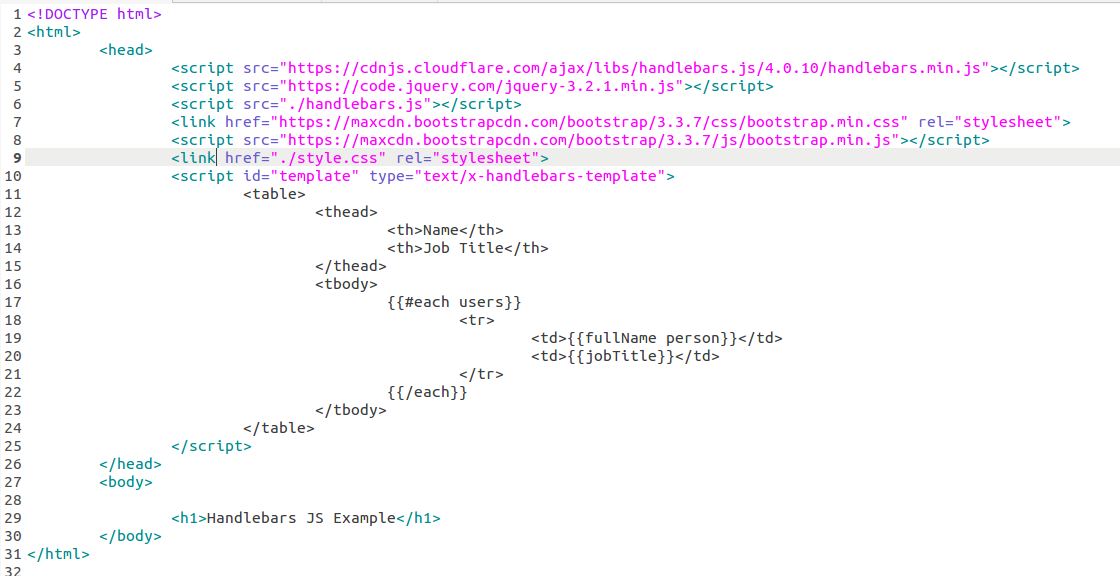
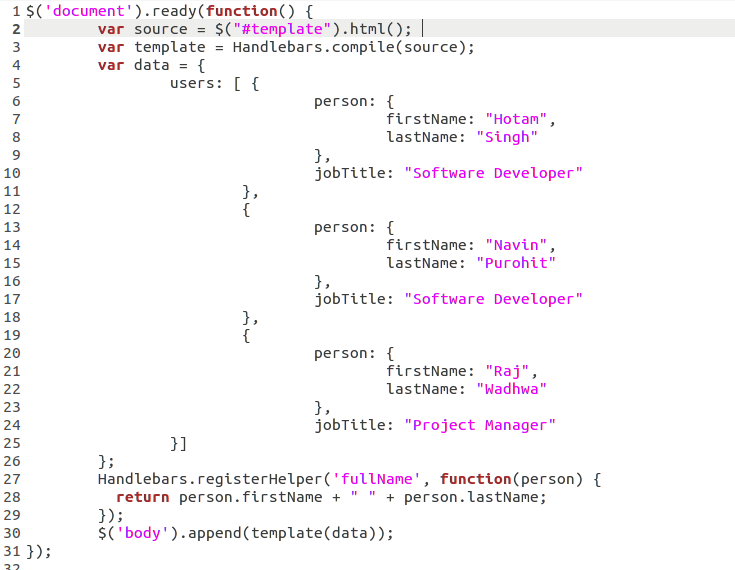
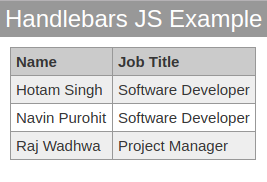
Let’s take an example to demonstrate the working of handlebars.js. First, create an HTML file in which a template is written inside <script> tag and this templated will be processed using handlebars.js. A table is created dynamically and value is inserted in that table.
Then create another JavaScript file(.js) to implement handlebars logic and include this .js file into your HTML file created.
Both the files are as follows:
handlebars.html:
handlebars.js
Output:


Cookies are important to the proper functioning of a site. To improve your experience, we use cookies to remember log-in details and provide secure log-in, collect statistics to optimize site functionality, and deliver content tailored to your interests. Click Agree and Proceed to accept cookies and go directly to the site or click on View Cookie Settings to see detailed descriptions of the types of cookies and choose whether to accept certain cookies while on the site.















About Author
Hotam Singh
Hotam has 1.5 years of experience in Node.JS. He has worked on Front End, JavaScript, Jquery, Backbone.JS, Database: MySQL, MongoDB. His hobbies are playing Sudoku/Puzzles and watching movies.