How To Use Handlebars in Node JS
Posted By : Hotam Singh | 24-Sep-2017
In this article, we will be discussing how to use handlebars.js templating engine into our node.js application. I have given the brief introduction about handlebars in my previous blog “Introduction To Handlebars”.
So let’s get started with using handlebars in the node.js application. First, we need to create a server that will handle client requests. We can create a server in node.js using express(A framework in node.js which is used to create web application).
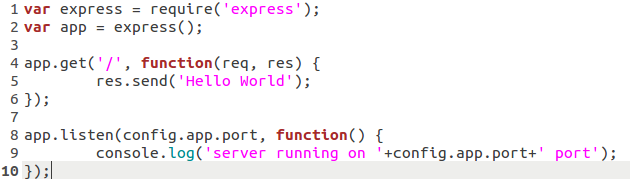
Consider the following code that will create a server and listens on specified port :
Now start using handlebars.

This will include “express-handlebars” module into our application.
Next step is to setup view engine.

Line no. 7 in above image will set up default “views” directory that view engine will look the files to be rendered.
Line no. 8 defines the view engine and setup default configuration for handlebars view engine.
Line no. 9 setups “
Next step is to create “views” directory and create another directory “layouts” inside “views” directory and create a file “layout.hbs” and put following code inside this file.
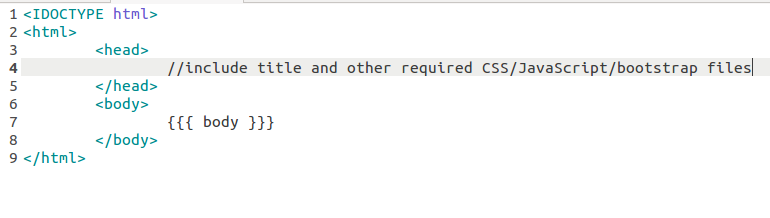
At Line no. 7, {{{ body }}} will append the whole body once our server renders any file keeping the head section same.
Now create another file “users.
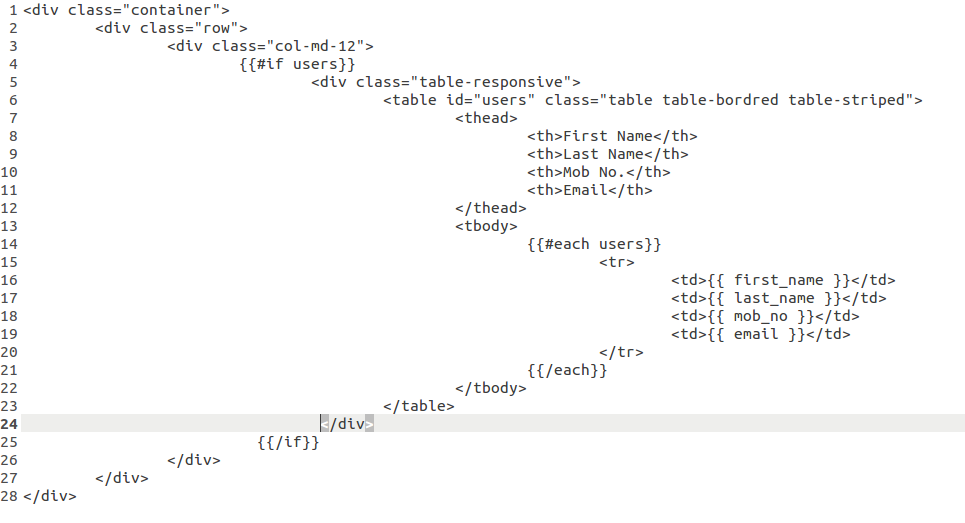
This body will append in the layout.
I have used two helpers {{#if }} and {{#each }}. {{#if }} helper will execute if we pass users(an array) list from the server.
{{#each }} helper will read each value on index base and these values will be shown in a table.
Now modify our get request “/” to “/users” to render user’s list on the browser.
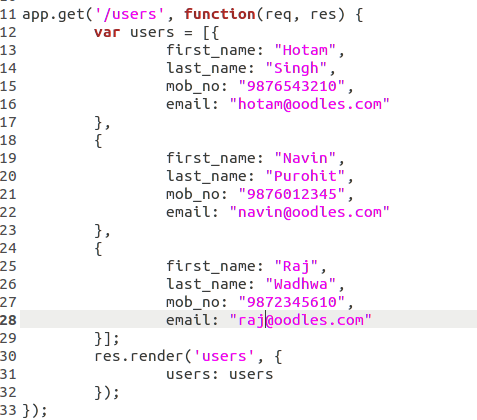
We will send a hardcoded user’s list that will be displayed on the browser. res.render() will render users.


Cookies are important to the proper functioning of a site. To improve your experience, we use cookies to remember log-in details and provide secure log-in, collect statistics to optimize site functionality, and deliver content tailored to your interests. Click Agree and Proceed to accept cookies and go directly to the site or click on View Cookie Settings to see detailed descriptions of the types of cookies and choose whether to accept certain cookies while on the site.















About Author
Hotam Singh
Hotam has 1.5 years of experience in Node.JS. He has worked on Front End, JavaScript, Jquery, Backbone.JS, Database: MySQL, MongoDB. His hobbies are playing Sudoku/Puzzles and watching movies.