How To Read XML File In JAVA
Posted By : Sanjay Saini | 29-Jan-2018
Hi Guys,
In this blog, I will going to explain to you how to read XML file using JAVA. In Java we have two ways to read XML file.
1. DOM Parser - Document Object Model
When you analyse an XML document with a DOM parser, you received a tree structure that
contains nodes of your document. The DOM give us many of functions.you can use to process the contents and structure of the document.
DOM interfaces
The DOM Uses many Java interfaces. List of comman Interfaces −
Node − Basic Data Type of DOM Modal.
Element − An Object represents as a Element.
Attr − Attribute Represents as a part of Elements.
Text − Content of the Element Or Attribute.
Document − Represents the whole document and a document Object represents as a tree.
2. SAX Parser - Simple API for XML
SAXParser give method to analyse XML document using event handlers.This class implements XMLReader interface and give over loaded versions of parse() methods to parse XML document from document.The actual resolution is done by the Handler class.We will need to create a handler class by implementing ContentHandler to parse the XML document.
For example StartDocument, EndDocument, StartElement, EndElement, CharacterData etc.
Difference Between DOM and SAX
DOM parser loads the whole document into the memory and using lots of memory during parsing.It is good for small sized files.it creates a tree format structure in the memory after loading the file.
SAX parser is following event-based approach and not load the whole document in the memory.It is read file step by step in the linear fashion and good for reading large XML files. I will show you both ways to read a XML file.Let's start with DOM Parser.
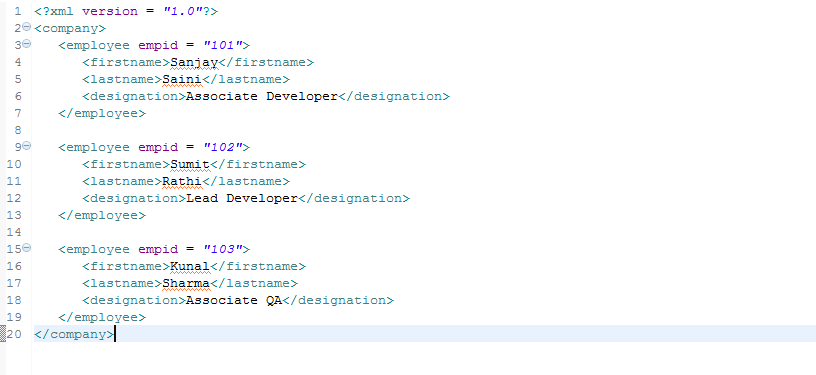
Sample XML File
Read XML file Using DOM Parser :
import java.io.File;

import javax.xml.parsers.DocumentBuilder;
import javax.xml.parsers.DocumentBuilderFactory;

import org.w3c.dom.Document;
import org.w3c.dom.Element;
import org.w3c.dom.Node;
import org.w3c.dom.NodeList;

public class ReadXMLUsingDOMParser {

	public static void main(String[] args) {
		try {
			File file = new File("sample.xml");
			DocumentBuilderFactory documentBuilderFactory = DocumentBuilderFactory.newInstance();

			DocumentBuilder documentBuilder = documentBuilderFactory.newDocumentBuilder();
			Document document = documentBuilder.parse(file);

			document.getDocumentElement().normalize();

			System.out.println("Root element :" + document.getDocumentElement().getNodeName());
			NodeList nodeList = document.getElementsByTagName("employee");

			System.out.println("==========================================");

			for (int index = 0; index < nodeList.getLength(); index++) {
				Node node = nodeList.item(index);
				System.out.println("\nCurrent Element :" + node.getNodeName());

				if (node.getNodeType() == Node.ELEMENT_NODE) {
					Element eElement = (Element) node;
					System.out.println("Emloyee ID : " + eElement.getAttribute("empid"));
					System.out.println("Employee First Name : "
							+ eElement.getElementsByTagName("firstname").item(0).getTextContent());
					System.out.println("Employee Last Name : "
							+ eElement.getElementsByTagName("lastname").item(0).getTextContent());
					System.out.println("Employee Designation : "
							+ eElement.getElementsByTagName("designation").item(0).getTextContent());
				}
			}
		} catch (Exception e) {
			System.err.println(e.getMessage());
			e.printStackTrace();
		}
	}

}
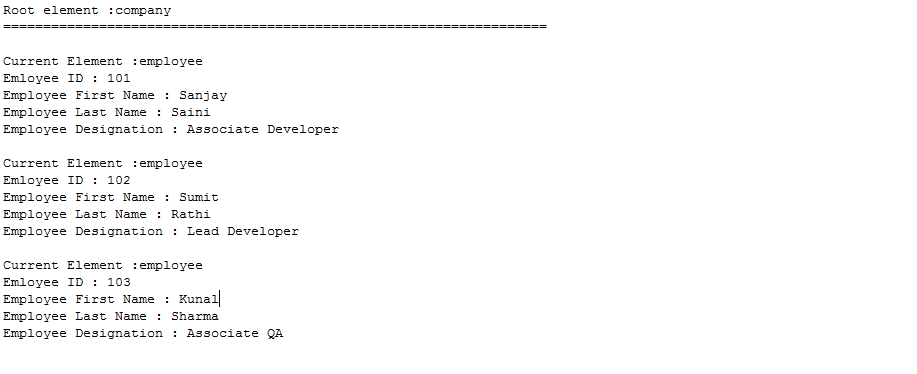
OUTPUT
Read XML file Using SAX Parser :
import javax.xml.parsers.SAXParser;
import javax.xml.parsers.SAXParserFactory;

import org.xml.sax.Attributes;
import org.xml.sax.SAXException;
import org.xml.sax.helpers.DefaultHandler;

public class ReadXMLUsingSAXParser {

	public static void main(String[] args) {

		try {

			SAXParserFactory saxParserFactory = SAXParserFactory.newInstance();
			SAXParser saxParser = saxParserFactory.newSAXParser();

			DefaultHandler defaultHandler = new DefaultHandler() {

				boolean empId = false;
				boolean firstName = false;
				boolean lastName = false;
				boolean designation = false;

				public void startElement(String uri, String localName, String elmt, Attributes attr)
						throws SAXException {

				System.out.println("Start Element :" + elmt);
					if (elmt.equalsIgnoreCase("EMPID")) {
						empId = true;
					}

					if (elmt.equalsIgnoreCase("FIRSTNAME")) {
						firstName = true;
					}

					if (elmt.equalsIgnoreCase("LASTNAME")) {
						lastName = true;
					}

					if (elmt.equalsIgnoreCase("DESIGNATION")) {
						designation = true;
					}

				}

				public void endElement(String uri, String localName, String elmt) throws SAXException {

					System.out.println("End Element :" + elmt);

				}

				public void characters(char chars[], int start, int len)  {
          try{
					if (empId) {
						System.out.println("EMPLOYEE ID : " + new String(new String(chars, start, len));
						empId = false;
					}

					if (firstName) {
						System.out.println("EMPLOYEE First Name : " + new String(chars, start, len));
						firstName = false;
					}

					if (lastName) {
						System.out.println("EMPLOYEE Last Name : " + new String(chars, start, len));
						lastName = false;
					}

					if (designation) {
						System.out.println("EMPLOYEE Designation : " + new String(chars, start, len));
						designation = false;
					}

				}cactch(SAXException sax){
                      sax.printStacktrace();
                      }
                  }
			};

			saxParser.parse("sample.xml", defaultHandler);

		} catch (Exception e) {
			e.printStackTrace();
		}

	}

}
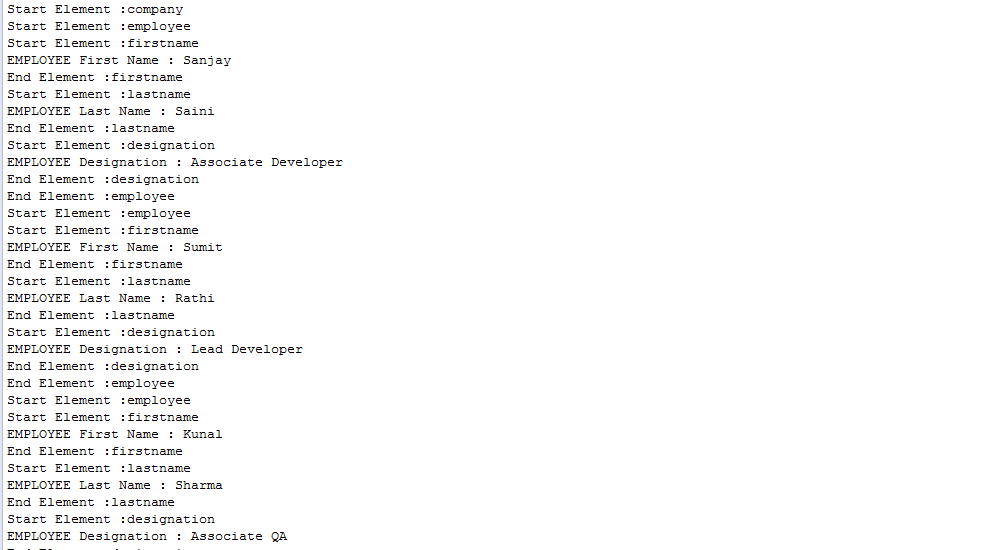
OUTPUT
Thanks
Sanjay Saini


Cookies are important to the proper functioning of a site. To improve your experience, we use cookies to remember log-in details and provide secure log-in, collect statistics to optimize site functionality, and deliver content tailored to your interests. Click Agree and Proceed to accept cookies and go directly to the site or click on View Cookie Settings to see detailed descriptions of the types of cookies and choose whether to accept certain cookies while on the site.















About Author
Sanjay Saini
Sanjay has been working on web application development using frameworks like Java, groovy and grails. He loves listening to music , playing games and going out with friends in free time.