How To Fake The Location of Your Photos In iOS
Posted By : Anirudh Bhardwaj | 20-Apr-2017
The photos app in iOS 10 is pretty amazing, isn’t it? Apart from showing you the photos, it has much more to offer. For instance, the “Memories” feature that compiles some of your recent photos and videos to create beautiful slideshows to keep the spirit of reminiscence alive. If you’ve turned ‘on’ the location settings, the app also shows the GPS location of the photos that you’ve taken at different places. Not only that, it categorizes the photos based on their location and also groups together the photos of different people in different folders.
But what if you want to hide or change the location of your photos? Even that can be done. However, the photos app in iOS doesn’t let you do that. For that, you have to install a third party application called Mappr.
You may also like This New Feature In Cortana Will Blow Your Mind.
How It Works?
The photos stored in your library have location-based metadata embedded inside them. Even the photos that you download from the internet or receive from someone else can have this data. The thing is, anyone who has access to a photo can also see the location, given that the location based metadata is attached to that photograph. But what if I say we can alter this data to spoof the actual location shown in your photograph? Well, that’s exactly what Mappr does. It lets you change the location of your photo by altering the metadata right before you share it. Once you do that, even after sharing your photograph, the location will remain updated. So the ones who receive your photo will only see the location that you want them to see.
How It’s Done?
First off, you need to download the Mappr app from the App Store. Once the app is installed in your iPhone/iPad, you can change the location of your photos in these simple steps.
-
Launch the Mappr app.
-
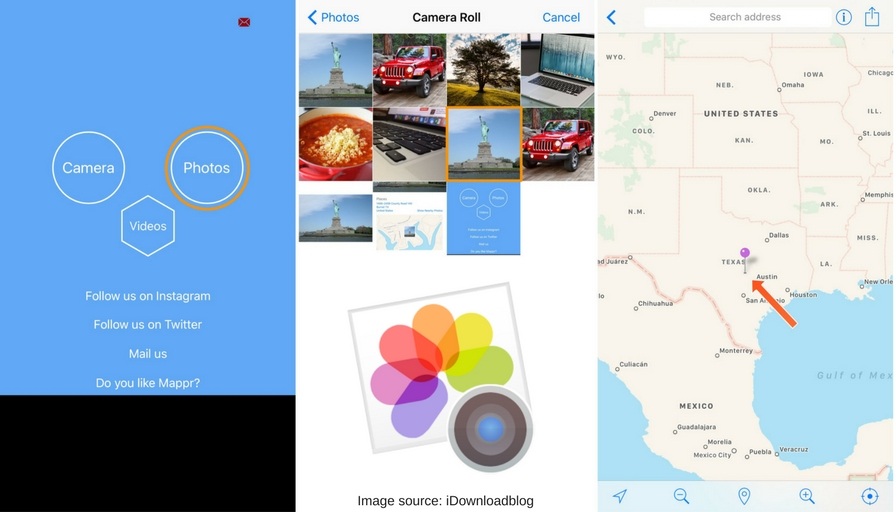
You’ll see a blue screen with three options i.e Camera, Photos, Videos.
-
Select Camera if you want to click a new photo and change its location. Select Photos if you want to change the location of your existing photographs from photo library. (Let’s assume that we want to change the location of an existing photograph)
-
Select Photos and allow access to use the photos.
-
Select a photo from your Photo Library.
-
Right after you choose a photograph, it will show you the original GPS location of that photo on a map. The location will be indicated by a colored pin placed somewhere on the map.
-
After that, you can drag and drop that pin to whatever location of Map that you want to show to your friends. For instance, let’s say your photo was taken in Seattle but with Mappr, you dragged the pin all the way to Vancouver and dropped it there. So now the updated location will be Vancouver, Canada.
-
As the popup menu appears, tap on the Save button to save all the changes.
So that’s pretty much how it works. Now wherever you share that photograph, the updated location will be shown to everyone. This was about the photos. You can also do the same to your videos but for that you need to download another app called Video Mappr.


Cookies are important to the proper functioning of a site. To improve your experience, we use cookies to remember log-in details and provide secure log-in, collect statistics to optimize site functionality, and deliver content tailored to your interests. Click Agree and Proceed to accept cookies and go directly to the site or click on View Cookie Settings to see detailed descriptions of the types of cookies and choose whether to accept certain cookies while on the site.















About Author
Anirudh Bhardwaj
Anirudh is a Content Strategist and Marketing Specialist who possess strong analytical skills and problem solving capabilities to tackle complex project tasks. Having considerable experience in the technology industry, he produces and proofreads insightful content on next-gen technologies like AI, blockchain, ERP, big data, IoT, and immersive AR/VR technologies. In addition to formulating content strategies for successful project execution, he has got ample experience in handling WordPress/PHP-based projects (delivering from scratch with UI/UX design, content, SEO, and quality assurance). Anirudh is proficient at using popular website tools like GTmetrix, Pagespeed Insights, ahrefs, GA3/GA4, Google Search Console, ChatGPT, Jira, Trello, Postman (API testing), and many more. Talking about the professional experience, he has worked on a range of projects including Wethio Blockchain, BlocEdu, NowCast, IT Savanna, Canine Concepts UK, and more.