Struts 2 Hibernate Integration Example [ Struts 2 + Hibernate Integration]
Posted By : Nagesh Chauhaan | 30-Nov-2012
In this blog I will explain a simple example on how to integrate Hibernate4 with in a web application developed in Apache Struts 2.x. This blog expects readers with basic knowledge in Struts2 and Hibernate4 , though its written for the beginners.
Lets start with an example. The applications starts with a blank Java Dynamic Web Application and we need to add some Struts2 + Hibernate libraries to it. The additional and the important thing we need is to add a filter entry in web.xml to tell the container that all the further requests are going to be handled by Strus2 . This application will take user’s data with a Struts2 Form and w’ll insert it into the database . The fields are than shown to next page as the are already put on request .
Here is a step to step explanation of the example.
Database Setup:
For this examlpe project, I am going to use the "oodles_db" MySQL database. I connect to this database on my machine using the username "root" and password “root”. First of all, you need to run the following script. This script creates a new table called user_data and required fields in SQL.
 CREATE DATABASE  IF NOT EXISTS `oodles_db` /*!40100 DEFAULT CHARACTER SET latin1 */;
USE `oodles_db`;
-- Table structure for table `user_data`
DROP TABLE IF EXISTS `user_data`;
/*!40101 SET @saved_cs_client     = @@character_set_client */;
/*!40101 SET character_set_client = utf8 */;
CREATE TABLE `user_data` (
  `user_id` int(11) NOT NULL AUTO_INCREMENT,
  `user_name` varchar(45) DEFAULT NULL,
  `user_password` varchar(45) DEFAULT NULL,
  `user_gender` varchar(45) DEFAULT NULL,
  `user_city` varchar(45) DEFAULT NULL,
  PRIMARY KEY (`user_id`)
) ENGINE=InnoDB AUTO_INCREMENT=13 DEFAULT CHARSET=latin1;
/*!40101 SET character_set_client = @saved_cs_client */;
Lets take a look at the Application Struture first.
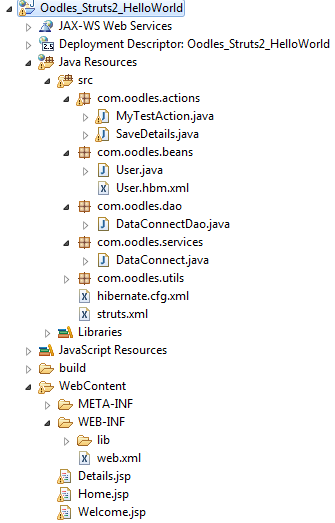
As we discussed before , we need to add libraries to our /WEB-INF/lib/, here is a list of require libraries that are to be added in lib folder.
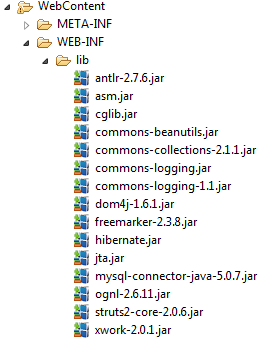
There a lot of libraries in Struts2 and Hibernate releases , but to make it more simple we have added required libraries only.
We need to add some code to our web.xml to make it aware of Struts, and to tell the container that all further requests are going to be Handle by Strus2 itself.
Web.xml
 <?xml version="1.0" encoding="UTF-8"?>
<web-app xmlns:xsi="http://www.w3.org/2001/XMLSchema-instance" xmlns="http://java.sun.com/xml/ns/javaee"
xmlns:web="http://java.sun.com/xml/ns/javaee/web-app_2_5.xsd" xsi:schemaLocation="http://java.sun.com/xml/ns/javaee http://java.sun.com/xml/ns/javaee/web-app_2_5.xsd" id="WebApp_ID" version="2.5">
  <display-name>struts2HelloWord</display-name>

 <welcome-file-list>
    <welcome-file>Welcome.jsp</welcome-file>
  </welcome-file-list>

  <filter>
        <filter-name>struts2</filter-name>
        <filter-class>org.apache.struts2.dispatcher.FilterDispatcher</filter-class>
    </filter>

    <filter-mapping>
        <filter-name>struts2</filter-name>
        <url-pattern>/*</url-pattern>
    </filter-mapping>

</web-app>
After this we are required to add a Hibernate Configuration file to handle Hibernate Activities. Add /src/ Hibernate.cfg.xml . Please edit the credential like username, password and connection string if required.
Hibernate.cfg.xml
 <?xml version='1.0' encoding='utf-8'? >
<!DOCTYPE hibernate-configuration PUBLIC
  "-//Hibernate/Hibernate Configuration DTD//EN"
  "http://hibernate.sourceforge.net/hibernate-configuration-3.0.dtd" >
<hibernate-configuration >
<session-factory >
     	<property name="connection.useUnicode" >true</property >
        <property name="connection.characterEncoding" >UTF-8</property >
   <property name="connection.driver_class" >com.mysql.jdbc.Driver</property >
<property name="connection.url" >jdbc:mysql://localhost:3306/oodles_db</property >
        <property name="connection.username" >root</property >
        <property name="connection.password" >root</property >

        <property name="dialect" >org.hibernate.dialect.MySQLDialect</property  >

        <property name="current_session_context_class" >thread</property >
		<property name="hibernate.transaction.factory_class" > org.hibernate.transaction.JDBCTransactionFactory</property >
		<property name="show_sql" & gt;true</property>
        <mapping resource="com/oodles/beans/User.hbm.xml"/>
      </session-factory& gt;
</hibernate-configuration >
struts.xml
Let us put it all together using struts.xml
<?xml version="1.0" encoding="UTF-8"?>
<!DOCTYPE struts PUBLIC
    "-//Apache Software Foundation//DTD Struts Configuration 2.0//EN"
    "http://struts.apache.org/dtds/struts-2.0.dtd">
<struts>
    <constant name="struts.enable.DynamicMethodInvocation" value="false" />
    <constant name="struts.devMode" value="true" />

        <action name="myTestAction" class="com.oodles.actions.MyTestAction" >
			<result name="success">/Home.jsp</result>
		</action>
		<action name="saveDetails" class="com.oodles.actions.SaveDetails" >
			<result name="success">/Details.jsp</result>
		</action>
		<!-- Actions end-->
    </package>
</struts>
Welcome.jsp
Let us now create the Welcome.jsp view file . This is the welcome file for our application , there is a link that w’ll call an action and redirect us to the Struts 2 form page.
<%@ taglib uri="/struts-tags" prefix="s" %>
<html><title>Oodles Struts2+ Hibernate</title>
<body style="{font-family:Segoe Print;text-align: center; }">
<h3>Hello , To render struts 2 action click below ! </h3></br>
<a href="<s:url action="myTestAction"/>" >click here</a>
</body></html>
Home.jsp
This Jsp file renders an Struts2 form to add data in database.
<%@ taglib uri="/struts-tags" prefix="s" %>
<h3>Here is a simple Struts2 form. </br>
Enter your details to save in database ! </br></h3>
</br>
</br>
<html><title>Oodles Struts2+ Hibernate</title>
<body style="{font-family:Segoe Print;text-align: center; }">
<center>
<s:form method="post" action="saveDetails.action"v
<s:textfield label="Name" name="name"/>
<s:password label="Password" name="password"/>
<s:radio list="{'Male','Female'}" label="Gender" name="gender"></s:radio>
<s:select list="{'Gurgaon','Moradabad','Delhi','Noida'}" name="city" label="City"></s:select>
<s:submit label="Save"></s:submit>
</s:form>
</center>
</body></html>
Details.jsp
This page shows the user details by getting them from request scope. In Struts2 , with the help of getter and setters fields can be sended directly to the directed page.
<%@ page language="java" contentType="text/html; charset=ISO-8859-1"
    pageEncoding="ISO-8859-1"%>
<%@ taglib uri="/struts-tags" prefix="s" %>
<html><title>Oodles Struts2+ Hibernate</title>
<body style="{font-family:Segoe Print;text-align: center; }">
Congratulations <s:property value="name"/> ! </br>
</br>
<table style="font-family: Palatino Linotype;" border="1">
<b></b><tr style="background-color:teal;color: white"><td>Name</td><td>Password</td> <td>Gender</td> <td>City</td></tr></b>
<tr><td><s:property value="name"/></td><td><s:property value="password"/>v/td>vtd>
<s:property value="gender"/></td>
User.java
Let us create an User Bean now , Create a simple class com/oodles/beans /User.java. This bean is to be saved by sending it to the datalayer directly.
package com.oodles.beans;
public class User {
	private int userId;
	private String name;
	private String password ;
	private String gender;
	private String city;

	public int getUserId() {
		return userId;
	}
	public void setUserId(int userId) {
		this.userId = userId;
	}
	public String getName() {
		return name;
	}
	public void setName(String name) {
		this.name = name;
	}
	public String getPassword() {
		return password;
	}
	public void setPassword(String password) {
		this.password = password;
	}
	public String getGender() {
		return gender;
	}
	public void setGender(String gender) {
		this.gender = gender;
	}
	public String getCity() {
		return city;
	}
	public void setCity(String city) {
		this.city = city;
	}
}
MyTestAction.java
Now lets create our first Struts2 Action com/oodles/Actions /MyTestAction.java, in Struts 2 actions are simple java classes and there is no need to extend any supporting class . But to make it simple lets extend ActionSupport class for now .This action class in nothing to do more with applicaton , rather than to render a JSP view.
package com.oodles.actions;
import com.opensymphony.xwork2.ActionSupport;
public class MyTestAction extends ActionSupport {
	public String execute(){
return SUCCESS;
		}
}
SaveDetails.java
No lets create the save details action com/oodles/Actions / SaveDetails.java. That w’ll perform the actual insertion by calling service methodes and passing beans to services .
package com.oodles.actions;

import com.oodles.beans.User;
import com.oodles.dao.DataConnectDao;
import com.opensymphony.xwork2.ActionSupport;

public class SaveDetails extends ActionSupport {


	private int userId;
	private String name;
	private String password ;
	private String gender;
	private String city;

	User user = new User();
	DataConnectDao dcd= new DataConnectDao();

	public String execute(){

		user.setCity(city);
		user.setGender(gender);
		user.setName(name);
		user.setPassword(password);
		user.setUserId(userId);

		dcd.insertDetailsDao(user);

		return SUCCESS;
		}

	public String getName() {
		return name;
	}

	public void setName(String name) {
		this.name = name;
	}

	public int getUserId() {
		return userId;
	}

	public void setUserId(int userId) {
		this.userId = userId;
	}

	public String getPassword() {
		return password;
	}

	public void setPassword(String password) {
		this.password = password;
	}

	public String getGender() {
		return gender;
	}

	public void setGender(String gender) {
		this.gender = gender;
	}

	public String getCity() {
		return city;
	}

	public void setCity(String city) {
		this.city = city;
	}
}
User.hbm.xml
Now time to create a mapping in between the two frameowrks, this file associate the java member variables to the database column name and create a mapping relation.
<?xml version="1.0"?>
<!DOCTYPE hibernate-mapping PUBLIC
  "-//Hibernate/Hibernate Mapping DTD 3.0//EN"
  "http://hibernate.sourceforge.net/hibernate-mapping-3.0.dtd">
<hibernate-mapping>
     <class name="com.oodles.beans.User" table="user_data">
     <id
        name="userId"
        type="integer"
        column="user_id"
        length="10"
       >
< id>
     <property
        name="name"
        type="string"
        column="user_name"
        length="256"
    />
    <property
        name="password"
        type="string"
        column="user_password"
        length="256"
    />
    <property
        name="gender"
        type="string"
        column="user_gender"
        length="256"
    />
    <property
        name="city"
        type="string"
        column="user_city"
        length="256"
    />
     </class>
</hibernate-mapping>
HibernateUtils.java
Now lets create a utility class to get a SessionFactory object . Create a class com/oodles/Utils / HibernateUtils.java.
package com.oodles.utils;
import org.hibernate.Session;
import org.hibernate.SessionFactory;
import org.hibernate.cfg.Configuration;

public class HibernateUtils {


	public static Session getSession() {
		SessionFactory sessionFactory = new Configuration().configure().buildSessionFactory();
		return sessionFactory.openSession();
	}
}
DataConnectDao.java
Now lets try to implement a slight DAO pattern , and create a helping class for 2 layered architecture . Create a class com/oodles/dao / DataConnectDao.java.
package com.oodles.dao;

import com.oodles.beans.User;
import com.oodles.services.DataConnect;

public class DataConnectDao {
	DataConnect dc = new DataConnect();
	public void insertDetailsDao(User user){
	dc.insertDetails(user);
	}
}
DataConnect.java
At last we have to add a Service class to interact database directly. Create a service class com/oodles/services/ DataConnect.java.
 package com.oodles.services;
import org.hibernate.Session;
import org.hibernate.Transaction;
import com.oodles.beans.User;
import com.oodles.utils.HibernateUtils;


public class DataConnect {
Session sess;

	public void insertDetails(User user){
		try{
			sess = HibernateUtils.getSession();
			Transaction tx = sess.beginTransaction();
			sess.save(user);

			System.out.println("Data Inserted in user_details");

			tx.commit();
			sess.close();
		}
		catch(Exception exep){
			exep.printStackTrace();
		}
	}
}
Now we are all done with Integration of Struts2 and Hibernate . After adding all the avobe files and libraries run the allpication on server. And you w’ll get output like these screens .
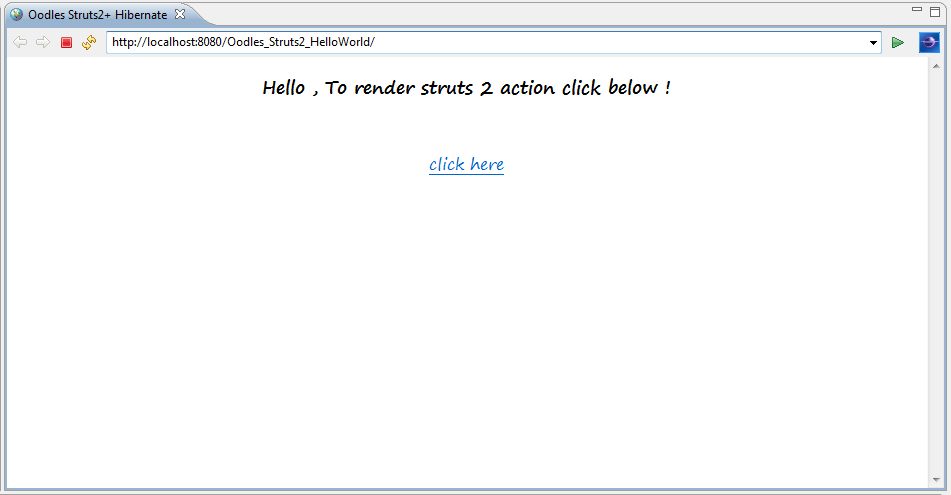
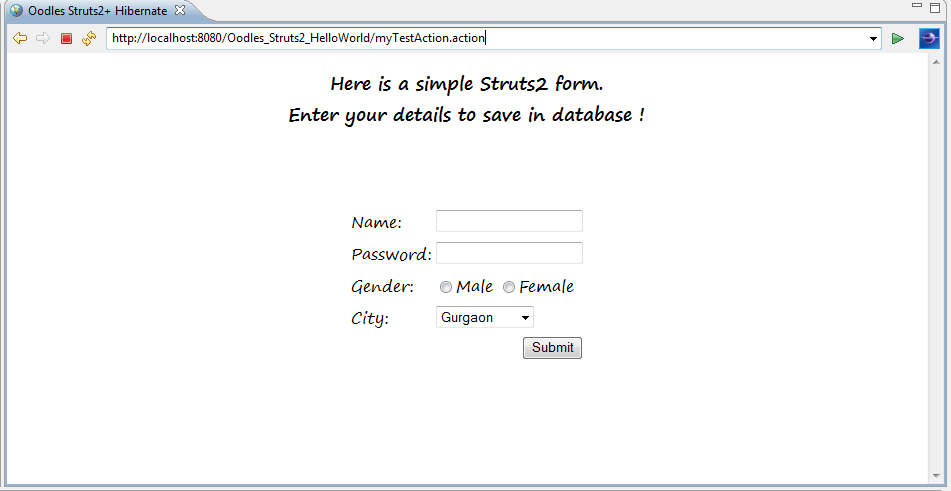
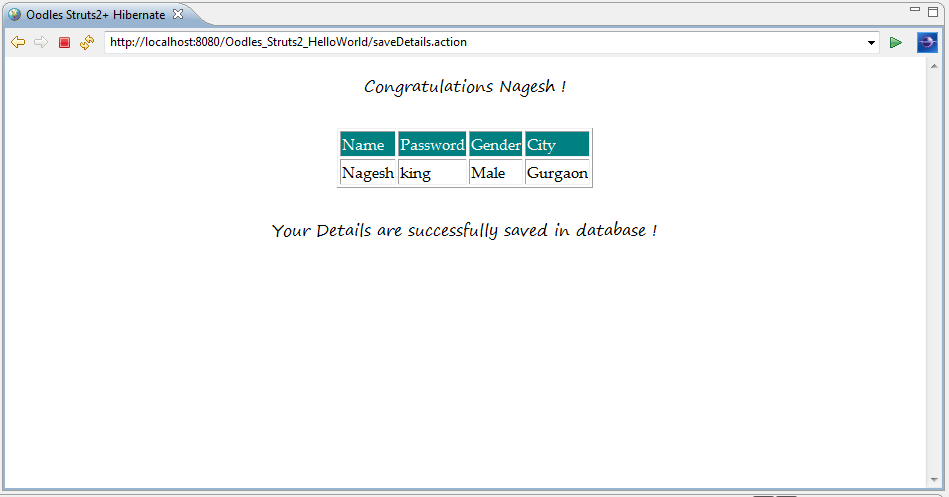
Once the data is successfuly inserted in Database , you w'll get something like this on your console.

The samle application code can be found at GitHub!
Struts framework process the request and passes it to the action for further processing. Action class uses Hibernate to make database calls and sends a bean directly to the database .
Hope it helps !
Nagesh Chauhan


Cookies are important to the proper functioning of a site. To improve your experience, we use cookies to remember log-in details and provide secure log-in, collect statistics to optimize site functionality, and deliver content tailored to your interests. Click Agree and Proceed to accept cookies and go directly to the site or click on View Cookie Settings to see detailed descriptions of the types of cookies and choose whether to accept certain cookies while on the site.















About Author
Nagesh Chauhaan