Sort Table Data in JSON on browser Grails
Posted By : Akash Sharma | 21-Feb-2014
Most of the times we have to sort table data on browser.
For Sorting data on browser we generally do following steps:
1. Send the column name to the action on which you have sort data
2. Sort data on server in controller
3. Receive sorted data on view and fill in table
But if you have hundreds and thousands of entries in your table, then it causes many calls to the server for sorting and even for many users.
While I was facing this as a real problem, I just thought that if we could store that data on browser and sort it on browser itself. That could save many server calls.
Now a question arises that where to store data on browser.
The answer is JSON.
Through this functionality, I get all the data of Table in first hit and store it in JSON on browser.
For sorting this data further, I sort the data with my custom JS code.
Below is the demo code which I want to share with you.
In the controller, I have passed full table data with list of column names to show in view.
Currently the table data is without pagination.
Domain Code:
package com.myapp.data

class Employee
{
  String name
  String age
  int salary
  String designation
  Date dob
  static constraints = {}
}
Controller Code:
class EmployeeController
{
  def sortTableData(){
    ArrayList fullTableData=Employee.list()
    List columnNameList=getColumnNameList("com.myapp.data.Employee")
    [fullTableData:fullTableData, columnNameList:columnNameList]
  }

  // Get list of column names of a domain class except id and version
  List getColumnNameList(String domainName)
  {
    def grailsDomainClazz=new DefaultGrailsDomainClass( grailsApplication.getClassForName(domainName) )
    def grailsDomainClazzProperties = grailsDomainClazz.getProperties()
    List columnNameList=new ArrayList()
    grailsDomainClazzProperties.each() {
      columnNameList.add( it.name)
    }
    columnNameList.remove('version')
    columnNameList.remove('id')
    return columnNameList
  }
}
In GSP , I created dynamic div ids and fill table data in it.
GSP file (sortTableData.gsp)
<%! import grails.converters.JSON %>

<html>
<head>
<meta name="layout" content="main" />
</head>
<body>
<g:javascript library="jquery"></g:javascript>
<g:set var="numOfColumn" value="${columnNameList.size() }"></g:set>
<g:set var="numOfRows" value="${fullTableData.size() }"></g:set>

Sort By:
<select id="columnSelectList">
  <g:each in="${columnNameList}" var="columnName">
    <option value="${columnName }">${columnName }</option>
  </g:each>
</select>

<table>
  <thead>
    <tr>
      <g:each in="${columnNameList}" status="i" var="columnName">
        <th>${columnName}</th>
      </g:each>
    </tr>
  </thead>
  <tbody>
    <g:each in="${fullTableData}" status="j" var="emp">
      <tr>
        <g:each in="${columnNameList}" status="i" var="columnName">
          <td id="${columnNameList[i]+j}"></td>
        </g:each>
      </tr>
    </g:each>
  </tbody>
</table>

<script type="text/javascript" src="${resource(dir: 'js', file: 'customTableSorting.js')}"></script>

<script type="text/javascript">

$(document).ready(function(){
  employeeList=[];
  columnNames=[];
  numOfColumn=${numOfColumn};
  numOfRows=${numOfRows};
  // Save table data in JSON variable employeeList
  saveTableData('${columnNameList as JSON}', '${fullTableData as JSON}');
  // On page load, table data is sorted on the basis of first column name by default
  sortResults('${columnNameList.get(0)}',true);
  // Fill sorted data in table
  fillDataInTable();
  bindSelectTag();
});
</script>

</body>
</html>
customTableSorting.js
// Parse model coming from action-controller to JSON variable
function parseModelToJS(jsonString)
{
  jsonString=jsonString.replace(/\"/g,'"');
  var jsonObject=jQuery.parseJSON(jsonString);
  return jsonObject
}

// Save table data in employeeList (array of objects) JSON variable
function saveTableData(columnNameList, fullTableData)
{
  columnNames=parseModelToJS(columnNameList);
  var employeeModelList=parseModelToJS(fullTableData);
  for(var counter=0; counter<numOfRows; counter++)
  {
    var employee=employeeModelList[counter];
    var empObject={};
    for(var columnCounter=0; columnCounter < numOfColumn; columnCounter++)
    {
      var columnName=columnNames[columnCounter];
      empObject[columnName]=employee[""+columnName+""];
    }
    employeeList.push(empObject);
  }
}

// Sort array of JSON objects on the basis of prop element
function sortResults(prop, asc)
{
  employeeList = employeeList.sort(function(a, b){
    if (asc) return (a[prop] > b[prop]) ? 1 : ((a[prop] < b[prop]) ? -1 : 0);
    else return (b[prop] > a[prop]) ? 1 : ((b[prop] < a[prop]) ? -1 : 0);
  });
}

// Fill employeeList (array of objects) JSON data in Table
function fillDataInTable()
{
  for(var counter=0; counter<numOfRows; counter++)
  {
    var empObject=employeeList[counter];
    for(var columnCounter=0; columnCounter < numOfColumn; columnCounter++)
    {
      var columnName=columnNames[columnCounter];
      $("#"+columnName+counter).html(employeeList[counter][""+columnName+""]);
    }
  }
}

//bind select tag change event
function bindSelectTag()
{
  $(document).on("change", "#columnSelectList", function(){
    sortResults(''+$("#columnSelectList option:selected").val()+'',true);
    fillDataInTable();
  });
}
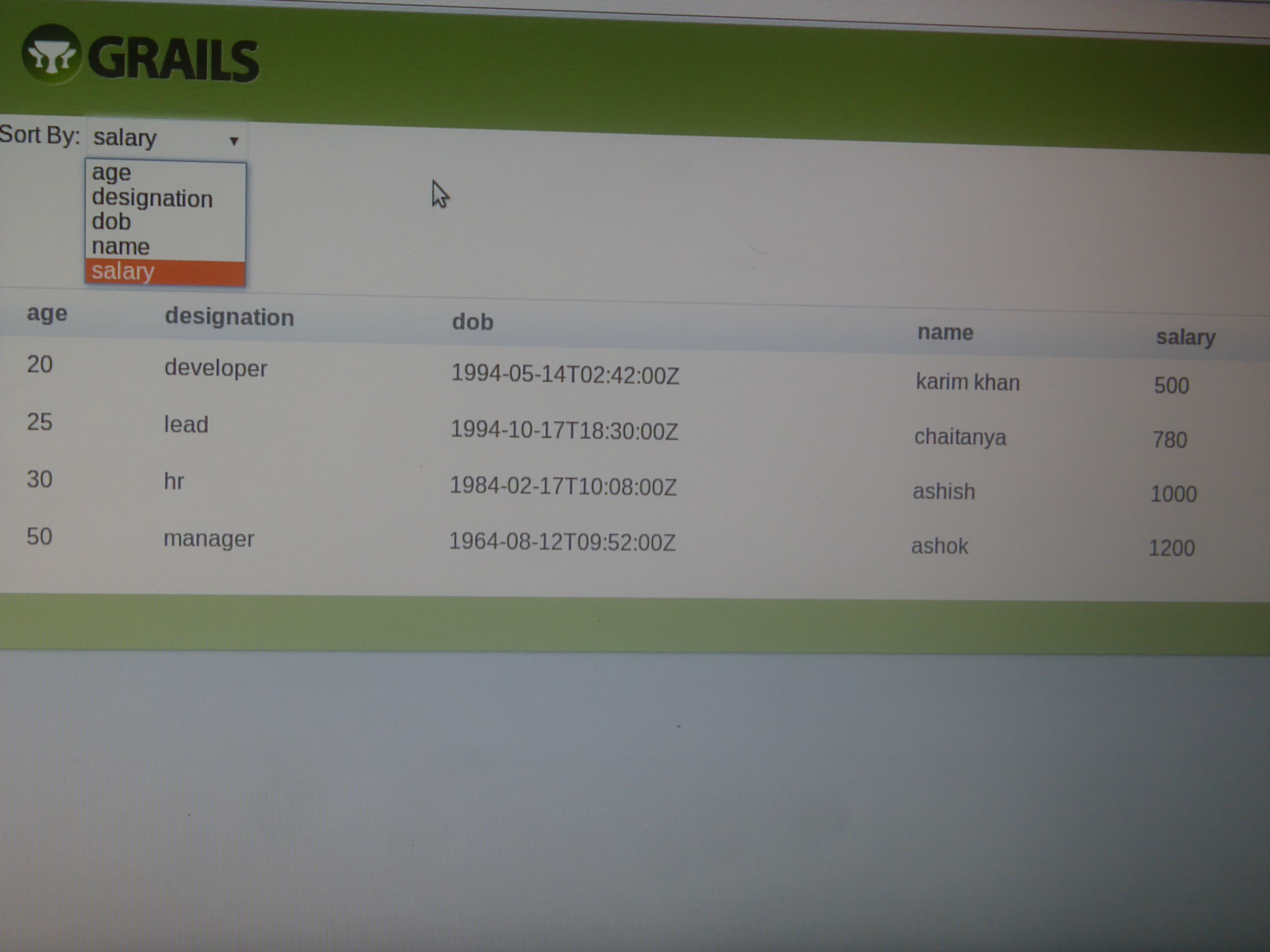
Here is the demo view for above code
Thanks
Akash Sharma


Cookies are important to the proper functioning of a site. To improve your experience, we use cookies to remember log-in details and provide secure log-in, collect statistics to optimize site functionality, and deliver content tailored to your interests. Click Agree and Proceed to accept cookies and go directly to the site or click on View Cookie Settings to see detailed descriptions of the types of cookies and choose whether to accept certain cookies while on the site.
















About Author
Akash Sharma
Akash is a bright Groovy and Grails developer and have worked on development of various SaaS applications using Grails technologies. Akash loves playing Cricket and Tennis