Working with Text to Speech in Android
Posted By : Ravi Sharma | 03-May-2013
One of the many features that Android provides is the one of “speech synthesis”.
This is also known as “Text-To-Speech” (TTS) and is mainly the capability of the device to “speak” text of different languages.
In this blog I am going to show you how to quickly introduce TTS capabilities into your application.
Here is the xml file
	<RelativeLayout xmlns:android="http://schemas.android.com/apk/res/android"

	 xmlns:tools="http://schemas.android.com/tools"

	 android:layout_width="match_parent"

	 android:layout_height="match_parent"

	 tools:context=".TTSActivity"

	 android:background="@drawable/canvas">


	    <EditText

	        android:id="@+id/enterText"

	        android:layout_width="fill_parent"

	        android:layout_height="wrap_content"

	        android:layout_alignParentLeft="true"

	        android:layout_alignParentTop="true"

	        android:layout_marginTop="105dp"

	        android:ems="10"

	        android:textColor="#ffffff" >


	    </EditText>


	    <TextView

	        android:id="@+id/textView"

	        android:layout_width="wrap_content"

	        android:layout_height="wrap_content"

	        android:layout_alignParentTop="true"

	        android:layout_centerHorizontal="true"

	        android:layout_marginTop="46dp"

	        android:text="Enter text below :-"

	        android:textSize="30dp"

	        android:textColor="#ffffff"/>


	    <Button

	        android:id="@+id/speakButton"

	        android:layout_width="150dp"

	        android:layout_height="70dp"

	        android:layout_centerHorizontal="true"

	        android:layout_centerVertical="true"

	        android:background="#2C70A0"

	        android:text="Speak" />


	</RelativeLayout>
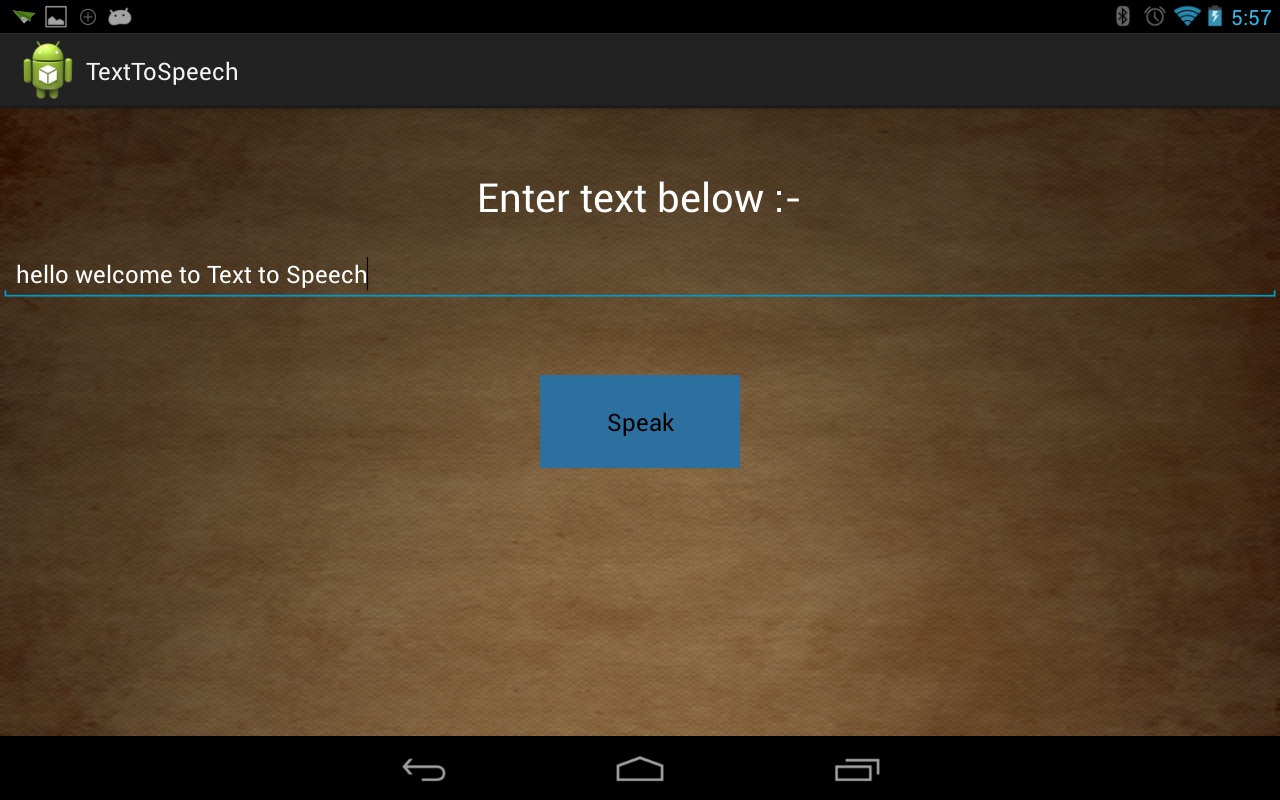
Three basic views are used edittext, textview, button.
And, here is the TTS Activity.
	package com.example.texttospeech;


	import android.os.Bundle;

	import android.app.Activity;

	import android.speech.tts.TextToSpeech;

	import android.speech.tts.TextToSpeech.OnInitListener;

	import android.view.Menu;

	import android.view.View;

	import android.widget.Button;

	import android.widget.EditText;

	import android.widget.Toast;


	public class TTSActivity extends Activity implements OnInitListener {

	    TextToSpeech talker;

	    EditText enteredText;

	    Button speak;

	    String text;


	    @Override

	    protected void onCreate(Bundle savedInstanceState) {

	        super.onCreate(savedInstanceState);

	        setContentView(R.layout.activity_tts);

	        speak = (Button) findViewById(R.id.speakButton);

	        enteredText = (EditText) findViewById(R.id.enterText);

	        talker = new TextToSpeech(this, this);


	    }


	    @Override

	    public void onInit(int arg0) {


	        if (arg0 == TextToSpeech.SUCCESS) {

	            speak.setOnClickListener(new View.OnClickListener() {


	                public void onClick(View arg0) {

	                    text = enteredText.getText().toString();

	                    talker.speak(text, TextToSpeech.QUEUE_FLUSH, null);

	                }

	            });


	        }

	    }


	}
In this activity whatever is entered in edittext you can hear that back by clicking on button.
Just implement the OnInitListener interface, within onInit method the check
if (arg0 == TextToSpeech.SUCCESS) ,
is very important since it might take some time for tts for initialisation so if this argument turns to be true only then you will be able to hear speech.
That's it. Hope it helps.
Here is the snapshot of working code.
Thanks,
Ravi Sharma


Cookies are important to the proper functioning of a site. To improve your experience, we use cookies to remember log-in details and provide secure log-in, collect statistics to optimize site functionality, and deliver content tailored to your interests. Click Agree and Proceed to accept cookies and go directly to the site or click on View Cookie Settings to see detailed descriptions of the types of cookies and choose whether to accept certain cookies while on the site.















About Author
Ravi Sharma
Ravi Sharma is an Android application developer with experience in Java , Titanium and Phonegap frameworks. Ravi loves drawing and PC games.