Memcached Integration with Grails
Posted By : Varun Sharma | 03-Dec-2012

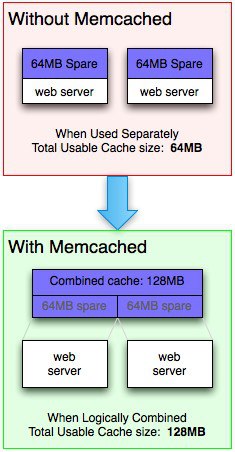
"Memcached is free & open source, high-performance, distributed memory object caching system, generic in nature, but intended for use in speeding up dynamic web applications by alleviating database load."
You can think of it as a short-term memory for your applications.
Installing Memcached:
sudo apt-get install memcached
OR
sudo yum install memcached.
Start Memcached:
After the installation, memcached should already be running. You can check by using the following command
netstat -tap | grep memcached
Usually you will get something like this:
tcp 0 0 localhost:11211 *:* LISTEN 2132/memcached
Note: If it is not running you can start memcached by runnig command:
sudo service memcached start
Using Spymemcached API:
Once your memcached is installed & running you need to use spymemcached API in to your garils application. For that you need to downlaod spymemcached jar (I have used spymemcached-2.7.1.jar)
You need to put spymemcached jar into lib folder of your grails application & configure the build path for the same.
Injecting Memcached into the Grails app:
Once you have the jar file in your application/lib, your next step is to create a Groovy class that will expose the API. Create a service named MemcachedService:
import net.spy.memcached.AddrUtil
import net.spy.memcached.MemcachedClient
import org.springframework.beans.factory.InitializingBean

class MemcachedService implements InitializingBean {

    static final Object NULL = "NULL"
    def MemcachedClient memcachedClient

    def void afterPropertiesSet() {
        memcachedClient = new MemcachedClient(AddrUtil.getAddresses
("localhost:11211"))
    }

    def get(String key) {
        return memcachedClient.get(key)
    }

    def set(String key, Object value) {
        memcachedClient.set(key, 600, value)
    }

    def delete(String key) {
        memcachedClient.delete(key)
    }

    def clear() {
        memcachedClient.flush()
    }

    def update(key, function) {
        def value = function()
        if (value == null) value = NULL
        set(key, value)
        return value
    }

    def get(key, function) {
        def value = get(key)
        if (value == null) {
            value = update(key, function)
        }
        return (value == NULL) ? null : value;
    }
}
Note: Choose host according to your host name. There is a cache timeout in set() method (600 which is 15 minutes), you can change that according to your requirement.
MemcachedService meets ContactController
To add the newly created MemcachedService into your ContactController, add the following line to your ContactController:
class ContactController {

    def memcachedService

    ...

}
you can call set() method of memcached service like
memcachedService.set(key,value)
you can call get() method of memcached service like
def cachedContactInstanceList = memcachedService.get("key")
log.debug "output: "+cachedContactInstanceList
if(cachedContactInstanceList == null){
// no key is found with the given key name,
//so you have to call set() method here to set the key.
}
else{
// you got the list, you can perform any offset like action on this too.
}
To flush all cached data:
telnet localhost 11211
Trying 127.0.0.1...
Connected to localhost.
Escape character is '^]'.
flush_all
OK
>Hope it helps !
Varun Sharma [email protected]


Cookies are important to the proper functioning of a site. To improve your experience, we use cookies to remember log-in details and provide secure log-in, collect statistics to optimize site functionality, and deliver content tailored to your interests. Click Agree and Proceed to accept cookies and go directly to the site or click on View Cookie Settings to see detailed descriptions of the types of cookies and choose whether to accept certain cookies while on the site.















About Author
Varun Sharma
Varun is an experienced Groovy and Grails developer and has worked extensively on designing and developing applications with FaceBook , Linkedin and Twitter integrations using Grails technologies. Varun loves painting and photography.