Integrating Spring 3 with Struts2 and Hibernate [Struts 2 + Spring + Hibernate]
Posted By : Nagesh Chauhaan | 10-Dec-2012
In one of my recent project, I went through the Integration of Spring 3 with Struts2 Framework. During this period I came to know that how easy it is to make classes Independent using a little configuration file. We can easily define all beans and dependencies in a single file. Today I am going to share my experience on how to integrate Spring in Struts 2 and Hibernate applications . In this simple example we will see how to Integrate Spring3 and Hibernate with Struts 2. By doing this we can utilize the Spring's powerful Dependency Injection feature to make our application more versatile and flexible.
Before we start let us look at the advantages of Integrating Spring with a Struts 2. As we all knows that Struts 2 is more established and more stable MVC2 framework at this time. But at the same time we have a very wonderful feature called Inversion of Control (IOC) design pattern given by Spring that makes Struts 2 a more flexible one. IOC is nothing but a lightweight container in which objects are managed using an external XML configuration file. To get independent object we just need to enter the properties in the external XML file.
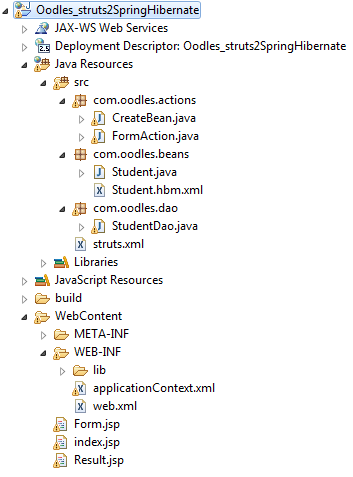
Using IOC in Struts 2 we can resolve the existing performance related problems of Java applications. Here is a snapshoot of overall Project Structure.
Project Structure
DB Script
To save Student data , we need to use MySQL database. Let us create a Database oodles_spring_struts_db and a table student_data in MySQL database.
 CREATE DATABASE  IF NOT EXISTS `oodles_spring_struts_db` /*!40100 DEFAULT CHARACTER SET latin1 */;
USE `oodles_spring_struts_db`;
--
-- Table structure for table `student_data`
--

DROP TABLE IF EXISTS `student_data`;
/*!40101 SET @saved_cs_client     = @@character_set_client */;
/*!40101 SET character_set_client = utf8 */;
CREATE TABLE `student_data` (
  `student_id` int(11) NOT NULL AUTO_INCREMENT,
  `firstName` varchar(45) DEFAULT NULL,
  `middleName` varchar(45) DEFAULT NULL,
  `lastName` varchar(45) DEFAULT NULL,
  `phoneNumber` varchar(45) DEFAULT NULL,
  `gender` varchar(45) DEFAULT NULL,
  `city` varchar(45) DEFAULT NULL,
  `emailId` varchar(255) DEFAULT NULL,
  PRIMARY KEY (`student_id`)
) ENGINE=InnoDB AUTO_INCREMENT=47 DEFAULT CHARSET=latin1;
/*!40101 SET character_set_client = @saved_cs_client */;
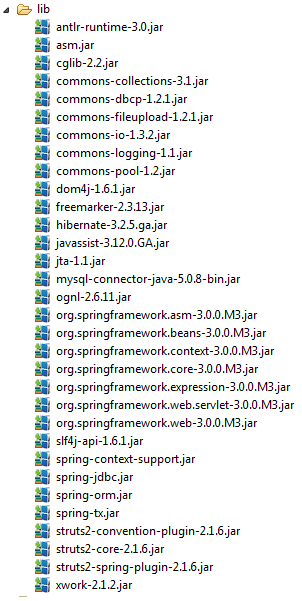
Required Liabraires
We are required a minimal set of libraries to make it working. Here is a list of libraries that I uses in my application .
index.jsp
<%@ taglib uri="/struts-tags" prefix="s" %>

<html><title>Oodles Struts 2+ Hibernate 3</title>

<body style="{font-family:Segoe Print;text-align: center; }">
<h3>Welcome to Struts 2 + Spring 3 Integration !</h3></br>
Lets Start now !
<a href="<s:url action="formAction"/>">click here</a>
</body></html>
web.xml
<?xml version="1.0" encoding="UTF-8"?>
<web-app xmlns:xsi="http://www.w3.org/2001/XMLSchema-instance" xmlns="http://java.sun.com/xml/ns/javaee" xmlns:web="http://java.sun.com/xml/ns/javaee/web-app_2_5.xsd" xsi:schemaLocation="http://java.sun.com/xml/ns/javaee http://java.sun.com/xml/ns/javaee/web-app_2_5.xsd" id="WebApp_ID" version="2.5">
  <display-name>Oodles_struts2SpringHibernate</display-name>
  	<filter>
		<filter-name>struts2</filter-name>
		<filter-class>org.apache.struts2.dispatcher.ng.filter.StrutsPrepareAndExecuteFilter</filter-class>
	</filter>
	<filter-mapping>
		<filter-name>struts2</filter-name>
		<url-pattern>/*</url-pattern>
	</filter-mapping>
	<context-param>
	    <param-name>contextConfigLocation</param-name>
	    <param-value>WEB-INF/applicationContext.xml</param-value>
  	</context-param>

	<listener>
    	<listener-class>org.springframework.web.context.ContextLoaderListener</listener-class>
	</listener>
	<welcome-file-list>
		<welcome-file>index.jsp</welcome-file>
	</welcome-file-list>
</web-app>
applicationContext.xml
<?xml version="1.0" encoding="UTF-8"?>
<beans xmlns="http://www.springframework.org/schema/beans"
xmlns:xsi="http://www.w3.org/2001/XMLSchema-instance"
xsi:schemaLocation="http://www.springframework.org/schema/beans
http://www.springframework.org/schema/beans/spring-beans-2.5.xsd">

    <bean id="dataSourceBean" class="org.apache.commons.dbcp.BasicDataSource" >
	    <property name="driverClassName" value="com.mysql.jdbc.Driver"/>
	    <property name="url" value="jdbc:mysql://localhost:3306/oodles_spring_struts_db"/>
	    <property name="username" value="root"/>
	    <property name="password" value="root"/>
	</bean>

	<bean id="sessionFactoryBean" class="org.springframework.orm.hibernate3.LocalSessionFactoryBean">
	    <property name="dataSource" ref="dataSourceBean"/>
	    <property name="mappingResources">
	        <list>
	            <value>com/oodles/beans/Student.hbm.xml</value>
	        </list>
	    </property>
	    <property name="hibernateProperties">
	        <value>hibernate.dialect=org.hibernate.dialect.MySQLDialect
	        hibernate.hbm2ddl.auto=update
	        hibernate.show_sql=true
	        </value>
	     </property>
	</bean>

    <bean id="hibernateTemplate" class="org.springframework.orm.hibernate3.HibernateTemplate">
	    <property name="sessionFactory">
	        <ref bean="sessionFactoryBean"/>
	    </property>
	</bean>

	<bean id="studentDao" class="com.oodles.dao.StudentDao" >
		<property name="hibernateTemplate" ref="hibernateTemplate" />
	</bean>

	<bean id="createBean" class="com.oodles.actions.CreateBean">
		<property name="studentDao" ref="studentDao" />
	</bean>
</beans>
Form.jsp
<%@ taglib uri="/struts-tags" prefix="s" %>
<h3>Enter details here !</br>
</h3>
</br>
</br>
<html><title>Oodles Struts 2+ Spring 3</title>
<body style="{font-family:Segoe Print;text-align: center; }">
<center>
<s:form method="post" action="createBean.action">
<s:textfield label="First Name" name="firstName"/>
<s:textfield label="Middle Name" name="middleName"/>
<s:textfield label="Last Name" name="lastName"/>
<s:textfield label="Phone Number" name="phoneNumber"/>
<s:textfield label="Email Id" name="emailId"/>
<s:radio list="{'Male','Female'}" label="Gender" name="gender"></s:radio>
<s:select list="{'Gurgaon','Moradabad','Delhi','Noida'}" name="city" label="City"></s:select>
<s:submit label="Save"></s:submit>
</s:form>
</center>
</body></html>
struts.xml
<!DOCTYPE struts PUBLIC
"-//Apache Software Foundation//DTD Struts Configuration 2.0//EN"
"http://struts.apache.org/dtds/struts-2.0.dtd">

<struts>
    <package name="myPack" extends="struts-default">

        <action name="createBean" class="com.oodles.actions.CreateBean">
            <result >/Result.jsp</result>
        </action>

        <action name="formAction" class="com.oodles.actions.FormAction">
            <result >/Form.jsp</result>
        </action>

    </package>
</struts>
FormAction.java
package com.oodles.actions;

import com.opensymphony.xwork2.ActionSupport;

public class FormAction extends ActionSupport {
	public String execute(){
		return SUCCESS;
		}
}
Student.java
package com.oodles.beans;

public class Student {

	private String studentId;
	private String firstName;
	private String middleName;
	private String lastName;
	private String phoneNumber;
	private String emailId;
	private String gender;
	private String city;


	public String getStudentId() {
		return studentId;
	}
	public void setStudentId(String studentId) {
		this.studentId = studentId;
	}
	public String getFirstName() {
		return firstName;
	}
	public void setFirstName(String firstName) {
		this.firstName = firstName;
	}
	public String getMiddleName() {
		return middleName;
	}
	public void setMiddleName(String middleName) {
		this.middleName = middleName;
	}
	public String getLastName() {
		return lastName;
	}
	public void setLastName(String lastName) {
		this.lastName = lastName;
	}
	public String getPhoneNumber() {
		return phoneNumber;
	}
	public void setPhoneNumber(String phoneNumber) {
		this.phoneNumber = phoneNumber;
	}

	public String getGender() {
		return gender;
	}

	public String getEmailId() {
		return emailId;
	}
	public void setEmailId(String emailId) {
		this.emailId = emailId;
	}
	public void setGender(String gender) {
		this.gender = gender;
	}
	public String getCity() {
		return city;
	}
	public void setCity(String city) {
		this.city = city;
	}
}
Student.hbm.xml
<?xml version="1.0"?>
<!DOCTYPE hibernate-mapping PUBLIC "-//Hibernate/Hibernate Mapping DTD 3.0//EN"
   "http://hibernate.sourceforge.net/hibernate-mapping-3.0.dtd">
<hibernate-mapping>
	<class name="com.oodles.beans.Student" table="student_data">
		<id name="studentId" column="student_id">
			<generator class="native">
			</generator>
		</id>
		<property name="firstName" />
		<property name="middleName" />
		<property name="lastName" />
		<property name="phoneNumber" />
		<property name="emailId" />
		<property name="gender" />
		<property name="city" />
	</class>
</hibernate-mapping>
CreateBean.java
package com.oodles.actions;

import java.util.ArrayList;
import java.util.List;
import com.oodles.beans.Student;
import com.oodles.dao.StudentDao;
import com.opensymphony.xwork2.ActionSupport;
import com.opensymphony.xwork2.ModelDriven;

public class CreateBean extends ActionSupport implements ModelDriven<student> {

	private String studentId;
	private String firstName;
	private String middleName;
	private String lastName;
	private String phoneNumber;
	private String emailId;
	private String gender;
	private String city;

	private Student student = new Student();
	private StudentDao studentDao;
	ArrayList<student> studentList = new ArrayList<student>();

	@Override
	public Student getModel() {
		// TODO Auto-generated method stub
		return null;
	}
	public String execute() throws Exception{
			student.setCity(city);
			student.setEmailId(emailId);
			student.setFirstName(firstName);
			student.setGender(gender);
			student.setLastName(lastName);
			student.setMiddleName(middleName);
			student.setPhoneNumber(phoneNumber);

			studentDao.saveOrUpdate(student);
			studentList = (ArrayList<student>) studentDao.getStudents();

		return SUCCESS;
		}

	public Student getStudent() {
		return student;
	}
	public void setStudent(Student student) {
		this.student = student;
	}
	public StudentDao getStudentDao() {
		return studentDao;
	}
	public void setStudentDao(StudentDao studentDao) {
		this.studentDao = studentDao;
	}
	public ArrayList<student> getStudentList() {
		return studentList;
	}
	public void setStudentList(ArrayList<student> studentList) {
		this.studentList = studentList;
	}
	public String getStudentId() {
		return studentId;
	}
	public void setStudentId(String studentId) {
		this.studentId = studentId;
	}
	public String getFirstName() {
		return firstName;
	}
	public void setFirstName(String firstName) {
		this.firstName = firstName;
	}
	public String getMiddleName() {
		return middleName;
	}
	public void setMiddleName(String middleName) {
		this.middleName = middleName;
	}
	public String getLastName() {
		return lastName;
	}
	public void setLastName(String lastName) {
		this.lastName = lastName;
	}
	public String getPhoneNumber() {
		return phoneNumber;
	}
	public void setPhoneNumber(String phoneNumber) {
		this.phoneNumber = phoneNumber;
	}
	public String getEmailId() {
		return emailId;
	}
	public void setEmailId(String emailId) {
		this.emailId = emailId;
	}
	public String getGender() {
		return gender;
	}
	public void setGender(String gender) {
		this.gender = gender;
	}
	public String getCity() {
		return city;
	}
	public void setCity(String city) {
		this.city = city;
	}

}
StudentDao.java
In this DAO Class we have added two methods , saveOrUpdate() persists Student bean in the database and getStudents() retrives a list of Student' objects.
package com.oodles.dao;

import java.util.List;
import org.springframework.orm.hibernate3.HibernateTemplate;
import com.oodles.beans.Student;

public class StudentDao {
	private HibernateTemplate hibernateTemplate;

	public void saveOrUpdate(Student student) {
		hibernateTemplate.save(student);
	}
	public List<student> getStudents() {
		return hibernateTemplate.loadAll(Student.class);
	}

	public HibernateTemplate getHibernateTemplate() {
		return hibernateTemplate;
	}
	public void setHibernateTemplate(HibernateTemplate hibernateTemplate) {
		this.hibernateTemplate = hibernateTemplate;
	}

}
Result.jsp
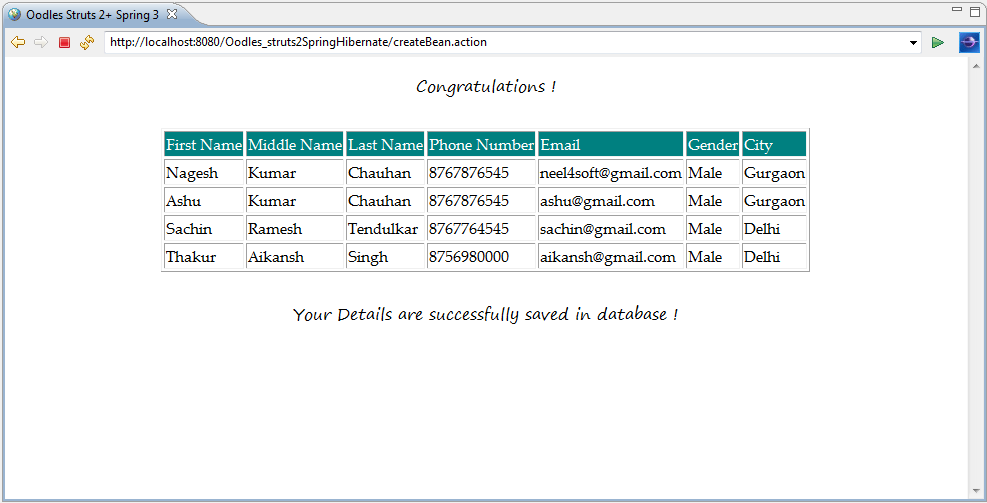
This Jsp file print out values from the list using the property tag, which uses the value at the top of the stack by default. Iteration is done by passing list to value attribute of iterator tag. Here studentList is automaticaly setted on request and can be used directly.
<%@ page language="java" contentType="text/html; charset=ISO-8859-1"
    pageEncoding="ISO-8859-1"%>
<%@ taglib uri="/struts-tags" prefix="s" %>

<htmlgt;<title>Oodles Struts 2+ Spring 3</title>
<body style="{font-family:Segoe Print;text-align: center; }">
Congratulations <s:property value="name"/> !</br>
</brgt;
<table style="font-family: Palatino Linotype;" border="1">
<b></b><tr style="background-color:teal;color: white">
<td>First Name</td>
<td>Middle Name</td>
<td>Last Name</td>
<td>Phone Number</td>
<td>Email</td>
<td>Gender</td>
<td>City</td></tr></b>
<s:iterator value="studentList">
<tr><td><s:property value="firstName"/></td>
<td><s:property value="middleName"/></td>
<td><s:property value="lastName"/></td>
<td><s:property value="phoneNumber"/></td>
<td><s:property value="emailId"/></td>
<td><s:property value="gender"/></td>
<td><s:property value="city"/></td></tr>
</s:iterator>
</table>
</br>
Your Details are successfully saved in database !
</body></html>
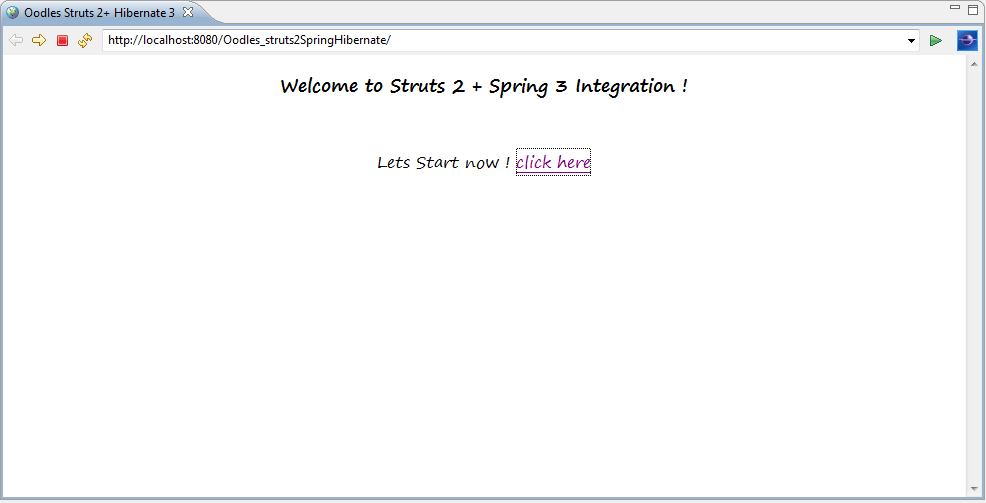
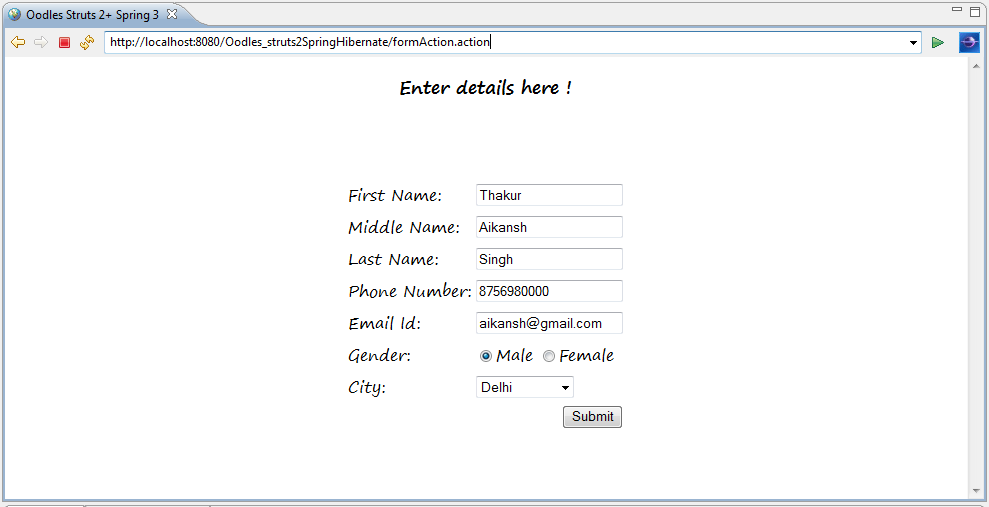
Now we are all done with Integrating Struts2 with Spring and Hibernate. After adding all the avobe files and libraries required result can be found as shown in the following screens .
Hope it helps !
Nagesh Chauhan


Cookies are important to the proper functioning of a site. To improve your experience, we use cookies to remember log-in details and provide secure log-in, collect statistics to optimize site functionality, and deliver content tailored to your interests. Click Agree and Proceed to accept cookies and go directly to the site or click on View Cookie Settings to see detailed descriptions of the types of cookies and choose whether to accept certain cookies while on the site.















About Author
Nagesh Chauhaan